
Is a Spine Atlas PNG an Animation Sheet? Check Before Splitting
Avoid splitting character parts into pretend animation frames. Identify the exported asset first, then choose runtime integration or genuine frame-image processing.
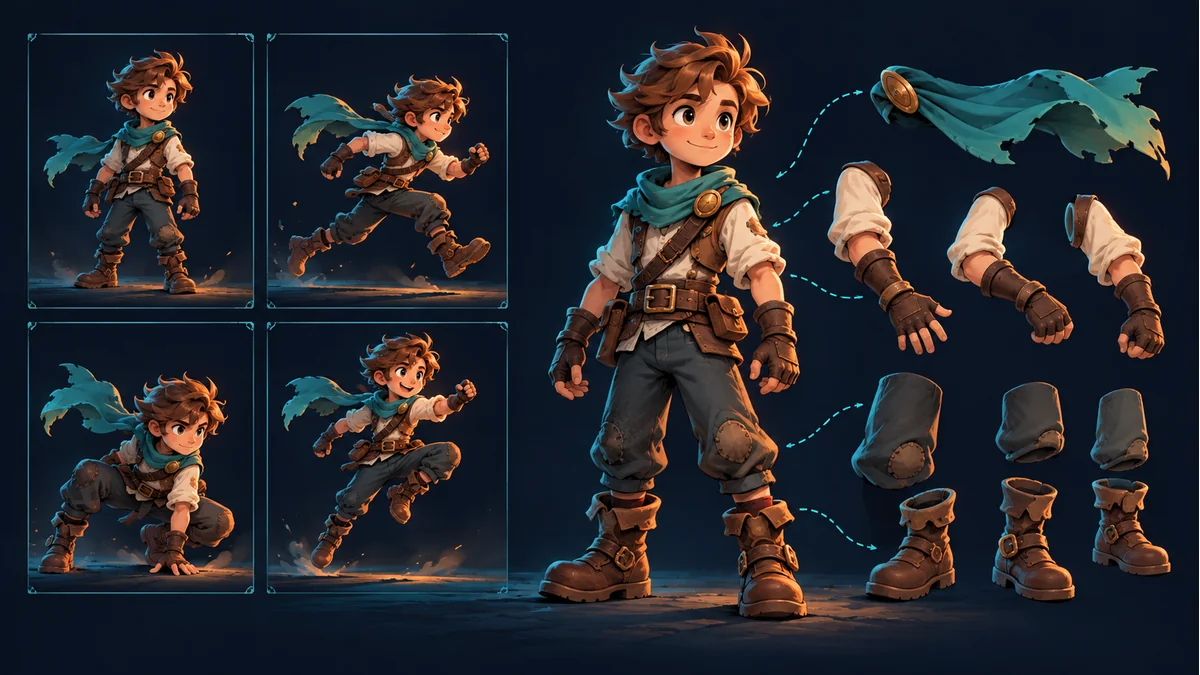
The cover reuses an AI-generated comparison of poses and character parts. It is not an actual exported atlas or evidence of a completed rig.
You open a Spine package, find a PNG, and send it to a sprite-sheet splitter. The results contain sleeves, boots, and scattered ornaments instead of complete moving characters. Before changing the grid, check the input. PNG identifies an image format, not whether that image contains a time-ordered sequence.
This guide starts after download. The multi-skin example in the Tooliva Spine Workbench tutorial includes shared JSON, an Atlas, and skin PNG files. Inspect your actual package rather than assuming every release offers identical export choices.
Inspect the picture before interpreting its filename
- If the image mainly contains separate heads, clothing, limbs, and other regions, it may hold character parts. Those regions are not automatically moments in time.
- If you can identify several complete character poses, check whether they really form the intended action and whether their ordering is known.
- If there is only one complete pose, increasing the grid count cannot create the missing action.
This is a visual starting point, not a format validator. Both parts and rendered frames can be packed into images, and their arrangements can differ. “It is one large PNG” is not enough information to choose a workflow.
Keep companion files from the same export together
The official Spine export documentation distinguishes data exports from image exports. Skeleton data and rendered image sequences serve different purposes; their use must match the actual project and runtime.
For the package shown in the workbench tutorial, keep the original archive and unpack that export into its own directory. Do not replace an image with a similarly named PNG from an older package. Likewise, JSON produced by different tools is not interchangeable just because the file extension matches.
If you need skeleton animation, follow the package route
When the target project will load Spine animation, hand off the matching data, images, and references as a set. Splitting a PNG alone does not preserve those relationships or complete integration. The person responsible for integration should inspect the actual files, runtime, and target project, then verify playback.
If you have not exported yet, return to Spine Workbench and confirm the resource and output being prepared. This article does not report an engine-version compatibility test or promise that every package will load directly.
If you need frames, obtain actual frame images first
When the handoff calls for complete rendered poses, obtain frame images through an editor or workflow that actually supports rendering that resource. Then split, order, or compose those images. Image-export options documented for the Spine editor should not be treated as proof of an identically named Tooliva Workbench button.
For a genuine sprite sheet or existing individual frames, use the animation frame tool. Its public workflow covers image splitting and composition. An option to export metadata.json does not establish that it accepts arbitrary Spine JSON and renders the skeleton automatically.
Answer four questions before splitting
- Required delivery: a skeleton-animation package or complete-pose image frames?
- Current input: a part atlas, a sheet of rendered poses, or a single still?
- Provenance: are the files from the same export, without older replacements?
- Next step: who will verify playback, or which confirmed workflow will produce the missing frames?
For example, if a teammate requests eight full-character running frames but your PNG only contains isolated parts, record that frame images are still needed. Dividing the image into eight cells will not create a run. The number is illustrative, not a claim about a template’s frame count. Choose the asset route before tuning image parameters.
Ready to try "Is a Spine Atlas PNG an Animation Sheet? Check Before Splitting"?
Use our online tools to apply this tutorial to your indie game project right away.